The problem with image hosting
I share images in a lot of different contexts: documentation, forum posts, Markdown files, HTML pages, chat. Every context wants a slightly different format. A raw URL. A Markdown image tag. A BBCode tag for forum software. An HTML <img> element.
Most image hosting services give you one format and make you construct the rest. Or they bury them under a cluttered interface built for social sharing instead of technical use. Services like Imgur work fine until they do not: they have changed policies on third-party embedding, have restructured their URL formats mid-use, and have intermittent reliability that makes them unreliable for documentation.
Owning my own image hosting means none of that affects me. The URLs are stable because I control the storage. The format output is exactly what I need because I built the interface to produce it.
How it works
The architecture is straightforward:
- Cloudflare R2 stores the uploaded images. R2 is S3-compatible object storage with no egress fees, which matters when images are embedded in pages and served repeatedly.
- A Cloudflare Worker handles the upload API. The front-end sends the image file to the Worker, which writes it to R2 and returns the public URL.
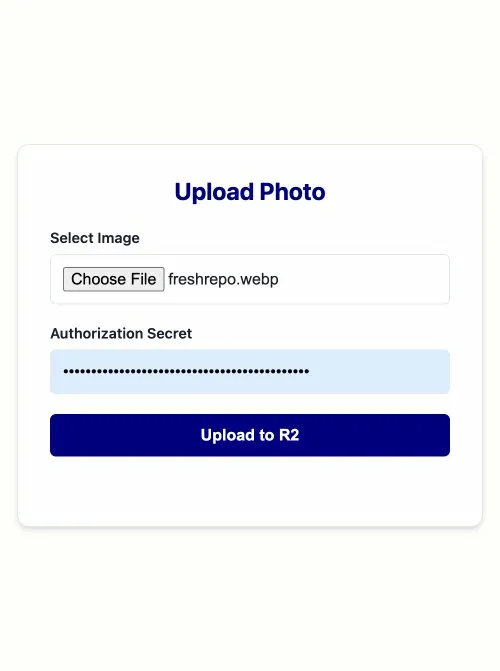
- An authorization secret gates the upload endpoint. The interface has a secret field that must match the Worker's environment variable before an upload is accepted. This keeps the endpoint private without requiring a full auth system.
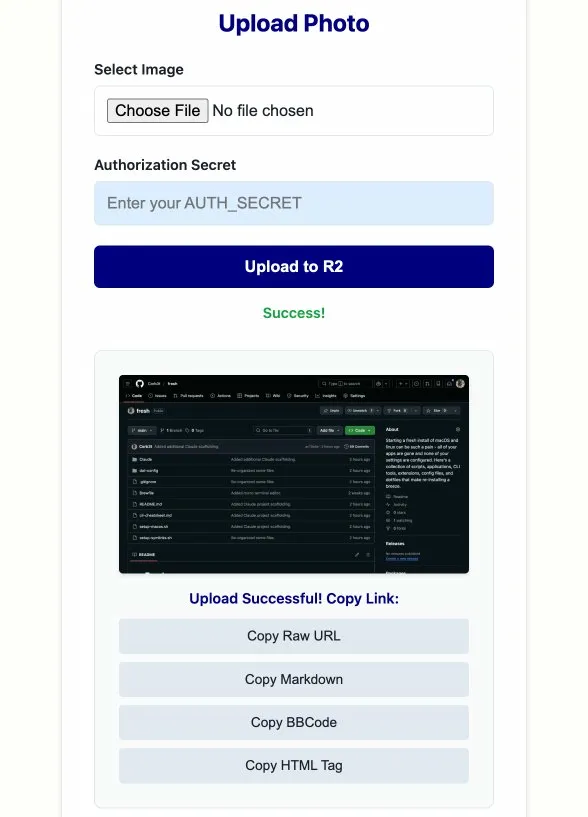
- The front-end is a plain HTML form with vanilla JS that calls the Worker, previews the uploaded image, and generates the four URL formats with one-click copy buttons for each.
The Worker upload handler
The core of the Worker is a single POST handler:
// worker.js -- handles image uploads to R2
export default {
  async fetch(request, env) {
    if (request.method !== "POST") {
      return new Response("Method not allowed", { status: 405 });
    }

    // Auth check
    const secret = request.headers.get("X-Auth-Secret");
    if (secret !== env.AUTH_SECRET) {
      return new Response("Unauthorized", { status: 401 });
    }

    const formData = await request.formData();
    const file = formData.get("image");
    const filename = `${Date.now()}-${file.name}`;

    await env.BUCKET.put(filename, file.stream(), {
      httpMetadata: { contentType: file.type }
    });

    const url = `https://photos.corbet.dev/${filename}`;
    return new Response(JSON.stringify({ url }), {
      headers: { "Content-Type": "application/json" }
    });
  }
};
The filename includes a timestamp prefix to avoid collisions without needing a UUID library or a database to track existing files.
The four output formats
Once the upload completes, the front-end generates and displays four copy buttons:
- Raw URL for pasting into browser address bars, curl commands, or anywhere that needs a plain link
- Markdown formatted as
for README files, documentation, and static site content - BBCode formatted as
[img]url[/img]for forum software and older community platforms - HTML formatted as a full
<img>tag for direct use in page source
Each button copies the raw text to the clipboard without any surrounding whitespace or markup. The copy button label briefly changes to "Copied" as confirmation, then resets.
Why R2 specifically
R2's zero egress fee is the main reason. S3 charges per GB transferred out, which adds up quickly when images are embedded in public pages and served to readers. R2 charges only for storage and write operations. For a personal image host serving a modest volume of traffic, the cost is effectively zero.
The Cloudflare Worker stays within the free tier for the volume I run through it. The whole infrastructure costs nothing to operate at my scale, which is exactly what a personal utility should cost.
The uploader is at photos.corbet.dev. It is locked behind an auth secret so it is not open for public use, but the architecture is straightforward to replicate for your own setup.
Recent updates
The original version was a single-purpose form: pick a file, enter your secret, click upload. That still works exactly as before, but five additions have meaningfully reduced the friction of daily use.
Saved auth secret
A "Remember" checkbox sits inline next to the auth secret field. When checked, the secret is written to localStorage under the key photos_auth_secret and reloaded automatically on every subsequent visit. Unchecking immediately removes it. The field stays in sync as you type, so checking the box after entering your secret saves it in real time without requiring a separate action.
Paste image from clipboard
A paste event listener on the whole document intercepts clipboard items with an image/* MIME type. The image is wrapped in a File object with a timestamped name (pasted-image-1234567890.png) and queued the same way a file-picker selection would be. The drop zone turns green and shows the filename and size to confirm the paste landed. This means taking a screenshot and hitting Cmd+V is now the fastest path to a hosted URL.
Paste or fetch an image URL
A new Image URL field sits below the drop zone with a Fetch button. Clicking Fetch, or pressing Enter while focused in the field, issues a fetch() to the URL, checks that the content-type is an image, converts the response to a Blob, wraps it as a File, and queues it just like a local file. Pasting a URL into the field also auto-triggers the fetch after a 50ms debounce. The file picker and URL field clear each other when used, so there is no ambiguity about which source is queued.
Auto-copy raw URL on success
Immediately after a successful upload, navigator.clipboard.writeText() copies the raw URL to the clipboard before the result panel has even finished rendering. A small green "✓ Raw URL automatically copied to clipboard" note appears below the copy buttons to confirm it happened. The four manual copy buttons still work as before for any other format.
iOS Shortcuts integration
The Worker was recently updated to support a cleaner API that makes iOS Shortcuts integration straightforward. The response now returns JSON with an ok flag, the filename, and the full public URL. It also accepts a text/plain response via the Accept header, which means the response body is just the bare URL with no parsing needed.
The Shortcut itself needs a single "Get Contents of URL" action configured as a PUT request:
- URL:
https://api.photos.corbet.dev/(no filename needed: the Worker auto-generates one from the timestamp) - Method:
PUT - Headers:
Authorization: Bearer YOUR_SECRET - Headers:
Content-Type: image/jpeg(orimage/pngdepending on source) - Headers:
Accept: text/plain. The response body becomes the URL directly, no JSON parsing required - Request Body: File, the image from your photo library or share sheet
After the upload action, a "Copy to Clipboard" action pointed at the result is all you need. The full Shortcut is four steps:
- Receive: Image, from Share Sheet or Photos
- Get Contents of URL: configured as above
- Copy to Clipboard: contents of step 2
- Show Notification: "Uploaded. URL copied." (optional)
The result is a share sheet action on any photo or screenshot that uploads directly to your R2 bucket and puts the URL on your clipboard in one tap, with no browser or webpage involved.